Find a song’s BPM and key, including half-time and double-time results
Check tempo against the beat, compare half/double-time candidates, and practice with a downloadable 120 BPM click track.
BPM means beats per minute. Load audio into BPM Detection to estimate tempo and key locally in your browser. Because this analyzes a file rather than looking up a song title, it accepts your own recordings. A single value may not describe a live performance or a track with tempo changes.
A 120 BPM practice file
Download the 16-second synthetic 120 BPM click track and load it into the tool. Clicks were placed every 0.5 seconds. This describes how the fixture was constructed, not a measured detection-accuracy result. The file is percussion only, so do not interpret its detected key as a meaningful tonal answer.
Analyze, then count the beat
- Load a song and wait for analysis. In the editor, results appear in the BPM & Key panel.
- Count along to the drums or accompaniment. At 60 BPM there is one beat per second; at 120 BPM there is one every half second.
- If the result feels half or double the expected tempo, try the panel's half/double controls. For example, 80 and 160 can describe different metrical levels of the same music.
- Check the later part of the song too. Increasing drift can indicate tempo changes or a small error in the estimate.
Treat key as a candidate
Related keys such as C major and A minor use many of the same notes and can be confused. Try the apparent resting note and bass notes on an instrument. Check separate sections when the song modulates. A confidence value is not necessarily a calibrated probability of being correct.
Use tempo for editing
A quarter note lasts 60,000 divided by BPM milliseconds. At 120 BPM that is 500 ms; an eighth is 250 ms and a dotted eighth is 375 ms. These are starting points for delay settings. Four bars of 4/4 contain 16 beats, which last eight seconds at 120 BPM. Check both the calculated duration and the actual downbeats when cutting loops.
When detection is ambiguous
Quiet introductions, syncopation, and sparse percussion can suggest several tempos. Repeating the analysis and seeing the same number does not prove it is right. Keep a human check using tap tempo or a metronome.
One production-browser check
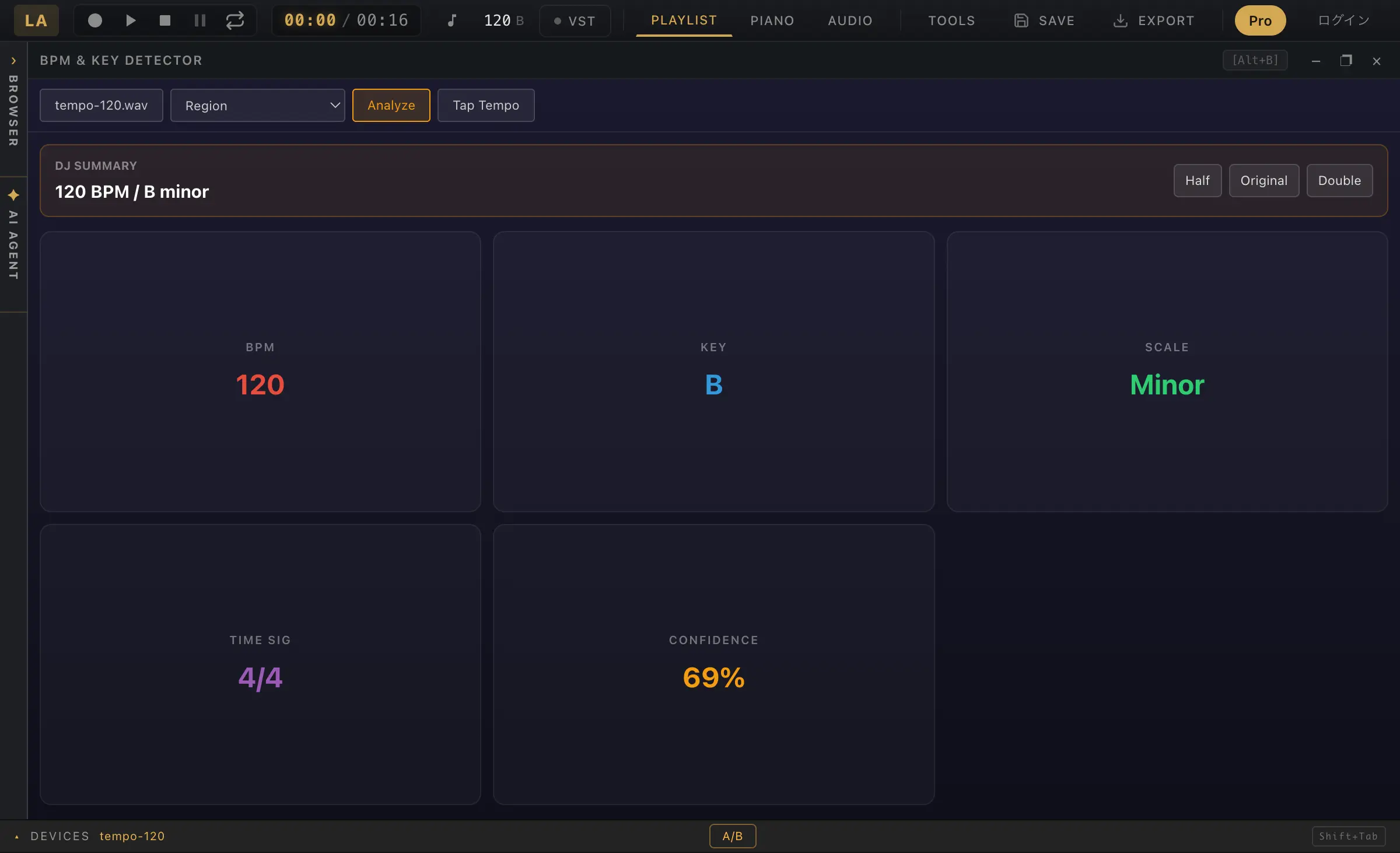
On September 6, 2026, the synthetic click above was loaded into the production tool in Chrome 152 on macOS. It displayed 120 BPM. It also reported B minor with 69% confidence for this percussion-only signal. This illustrates the difference between a displayed number and a musically meaningful key. It is one fixture in one environment, not a general accuracy or speed benchmark.
Check a key against a designed progression
The C-major and A-minor examples use synthetic chord progressions. The actual key labels matched the intended tonal centers, while 120 BPM note spacing produced estimates of 118 and 119 BPM. Compare the constructed input with the displayed result.